Fujitsu – PaperStream Capture
PaperStream Capture
Simple and powerful front capture software
PaperStream Capture is the image capture software specially designed for RICOH fi/SP Series Image Scanners. With its single button scanning and release options, the end-to-end workflow for scanning to release is simpler and faster than ever before. Offering powerful image capture optimization as well as data extraction and organizational capabilities, it possesses an intuitive interface with its simple yet enriched scanning processes.
- Simple user interface for a smooth workflow
- "Setting Assistant" proposes optimal scan setting for frequently used operations
- Save scanned data to multiple destinations
- Multiple ways to sort and index
- "PDF Keyword Setting” assists quick file searching
- Two ways of creating jobs: Easy Setup mode with simple operation and Advanced Setup mode for creating a job for a combination of multiple purpose
- Effective features to streamline scanning workflow
- Operate with PaperStream IP driver
- For more powerful and advanced functions, superior options are available. Please refer to the PaperStream Capture Pro/Pro Premium tab for more details.
Achieve work efficiency through automated scan processes
PaperStream Capture creates jobs based on the scope of work. With a single touch on the icon, users are able to begin scanning.
Multiple scanning options
Simple batch scanning is feasible with default scanning and predefined templates. Spot, ad-hoc scans, are possible as well.
Operational connectivity with scanned data
PaperStream Capture is compatible with multiple back-office connectivity options and connects with popular destinations like network folders, SharePoint, email, and other applications.The following destinations are available by default. By installing “PaperStream Connector Option*”, users can connect to other cloud services or send scanned data via e-mail and FAX directly.

“Setting Assistant” proposes optimal scan settings for frequently used operations
Connect your interests quickly by sharing
Frequent, manual operations like deleting blank pages or correcting page orientations, can be significantly reduced by following the suggestions that pop up in the software notifications.

Effortless creation of scan settings for streamlined data preservation
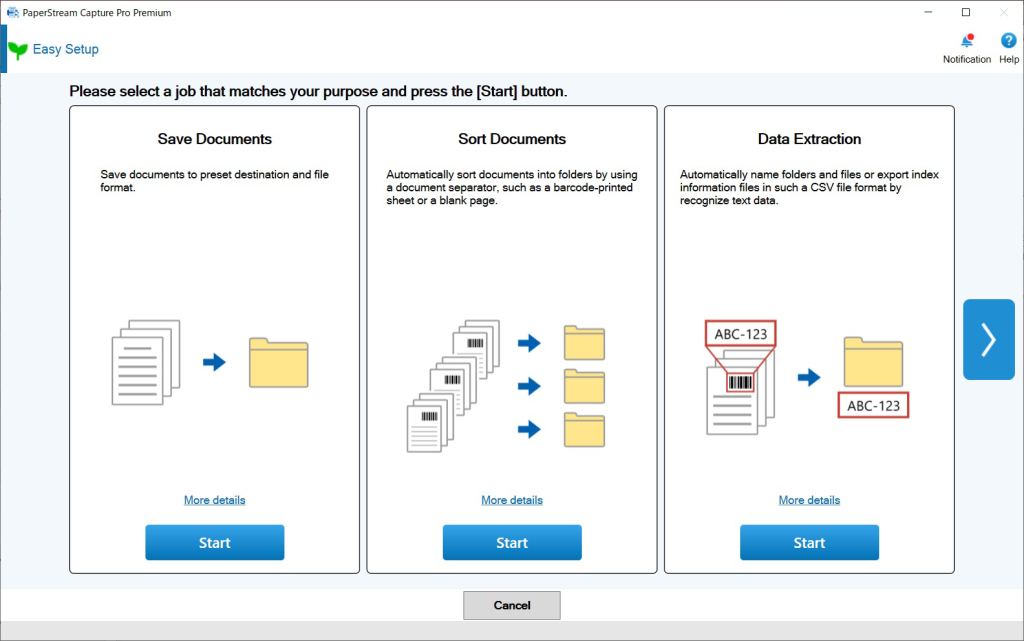
In the Easy Setup mode, operators have the choice of three options: Save Documents, Sort Documents, or Data Extraction. They can effortlessly create a job by selecting an option that suits their purpose and configure the settings according to the displayed instructions.
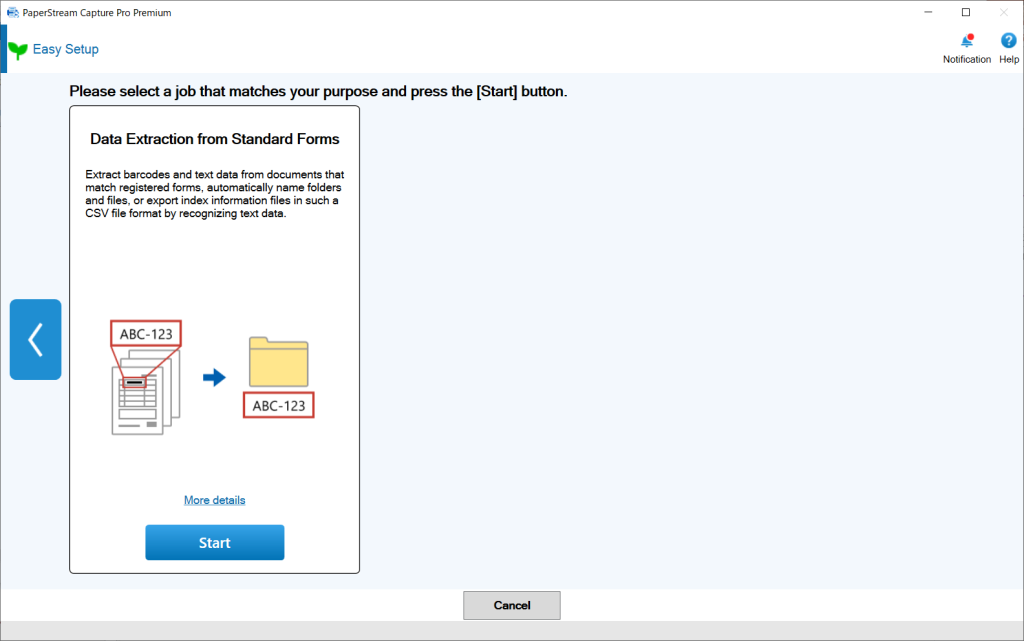
For users who want to create job for combination of multiple purposes, Advanced Setup mode is also available.
Please refer to the Manual Downloads page for more information about these modes.
Multiple ways to sort and index
Automated document separation
Documents can be grouped, indexed and named using various ways.
Using extracted data from scanned images
With zonal OCR and barcode recognition, users can define areas on documents and establish preset rules to automate file naming and folder creation. The extracted data can be exported to CSV files as index information.
“PDF Keyword Setting” assists quick file searching
Keywords can be automatically added to a PDF document using text information captured from the scanned data or using pre-determined fixed characters. Document retrieval is not constrained to file names alone, making it easier to locate documents when required.

Effective features to streamline scanning workflow
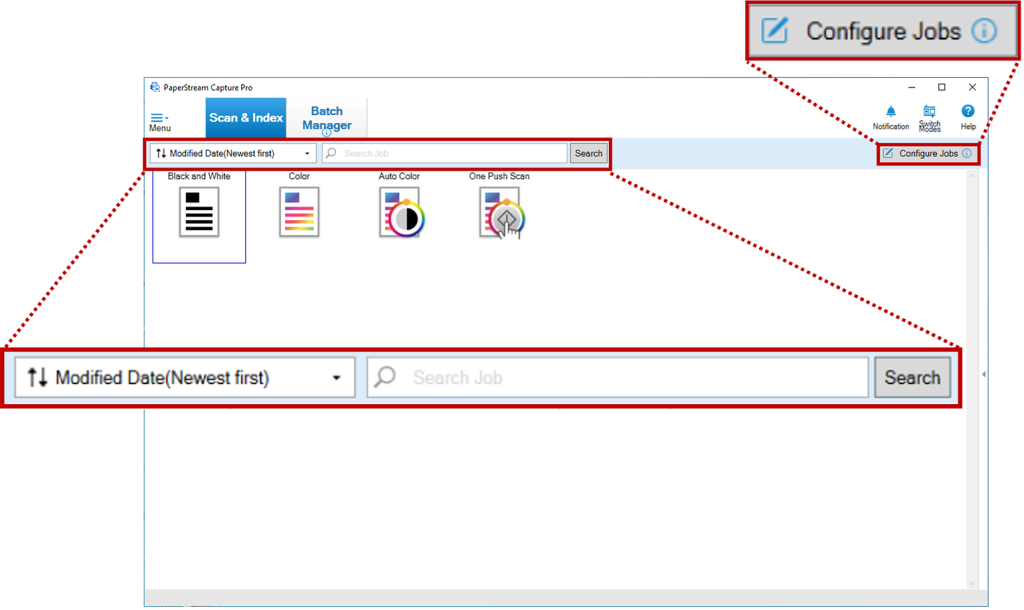
PaperStream Capture offers intuitive and stress-free operation, especially in the situations where centralized scanning is prevalent. Features such as the Configure Jobs button and the filtering function enhance work efficiency.
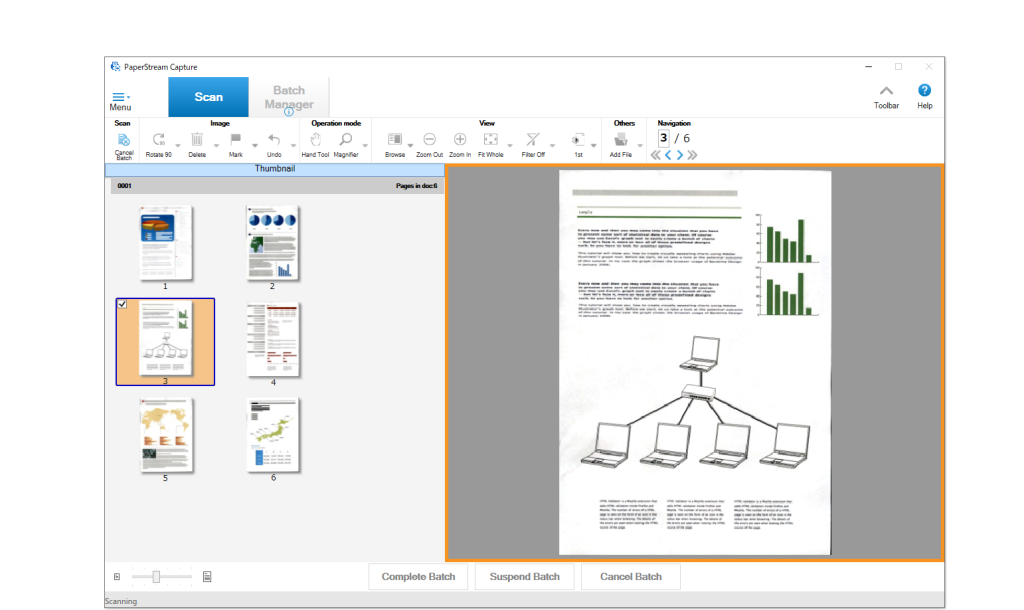
Additionally, users can select and confirm scanned data on an enlarged screen in the middle of scanning.
Preventing overlook of scanning error
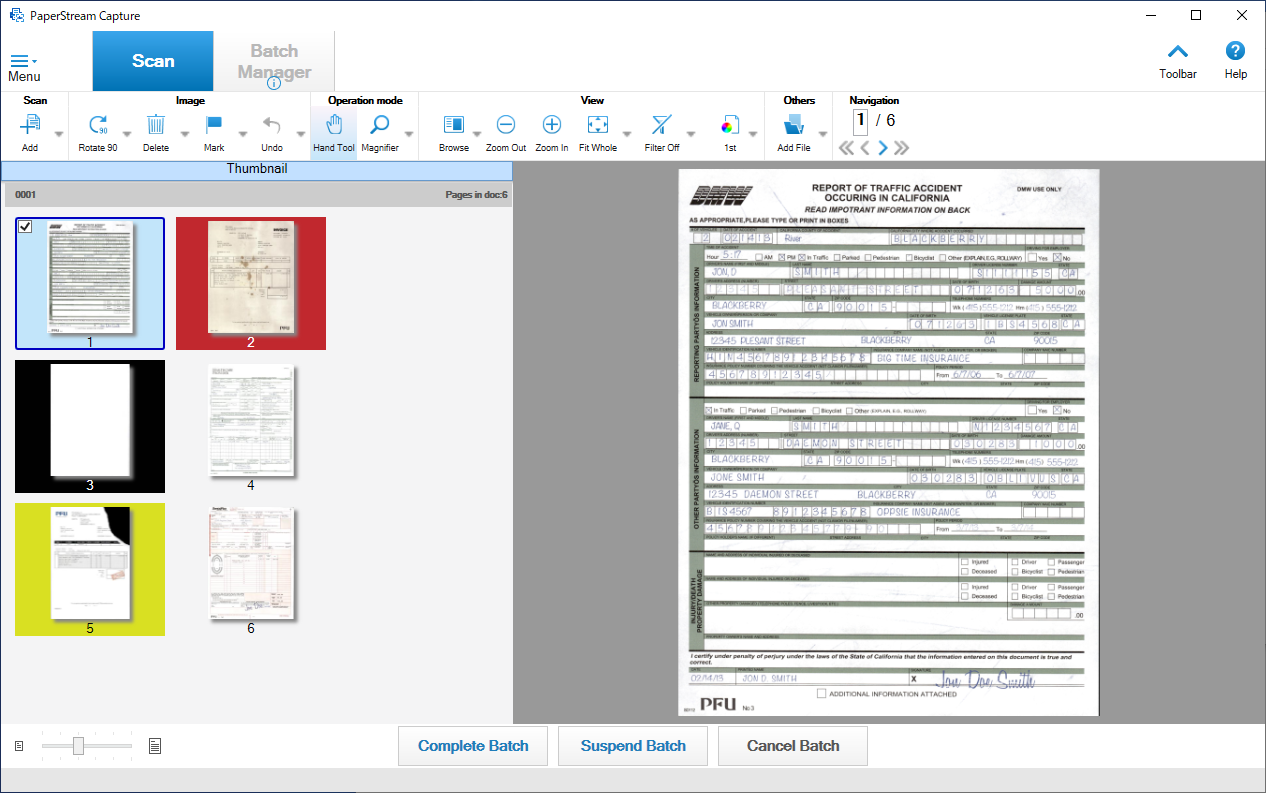
PaperStream Capture comes with Image Check function. Scanned results are displayed with easily recognizable color markings. Users are able to instantly recognize any multi-feed or other errors.
*1 AIQC supported model: fi-8950/fi-8930/fi-8820/fi-7900/fi-7800/fi-7700/fi-7700S/fi-7600/fi-8190/fi-8290/fi-7480/fi-7460/fi-8170/fi-8270/fi-8150/fi-8250/fi-7300NX
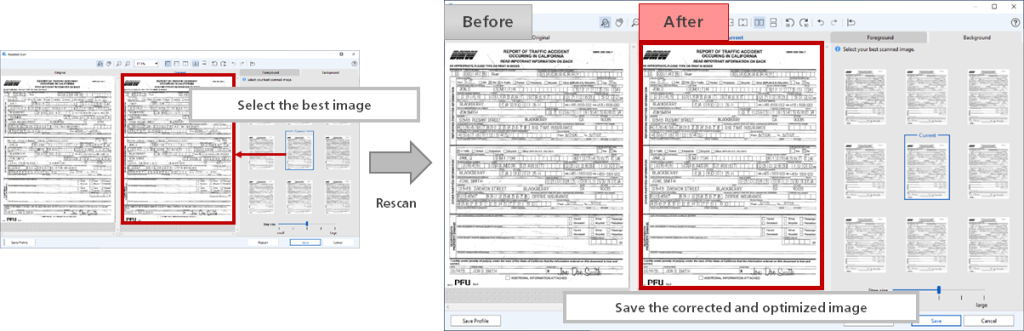
Select the best image with “Assisted Scan”
Operators are able to instantly select the best image without the need for any fine setting adjustments. Assisted Scan makes automatic image enhancements and replaces unsatisfactory scans with the best scans available.
Specifications
| Product Name | PaperStream Capture | PaperStream Capture Pro | PaperStream Capture Pro Premium | |
|---|---|---|---|---|
| Supported Scanners | Workgroup | fi-8040/fi-70F/fi-8170/fi-8270/fi-8150/fi-8250/fi-7300NX/fi-800R/SP-1425/SP-1130N/SP-1125N/SP-1120N | ||
| Departmental | fi-8190/fi-8290/fi-7480/fi-7460 | |||
| Low-Volume Production | fi-7700/fi-7700S/fi-7600 | NA | fi-7700/fi-7700S/fi-7600 | |
| Mid-Volume Production | fi-8950/fi-8930/fi-8820/fi-7900/fi-7800 | NA | fi-8950/fi-8930/fi-8820/fi-7900/fi-7800 | |
| Discontinued | fi-7030/fi-7180/fi-7280/fi-7160/fi-7260/fi-7140/fi-7240/fi-65F/SP-1130/SP-1125/SP-1120/fi-6140Z/fi-6240Z/fi-6130Z/fi-6230Z/fi-6110/fi-5530C2/fi-5950/fi-6800/fi-6400/fi-6770/fi-6750S/fi-6670 | fi-7030/fi-7180/fi-7280/fi-7160/fi-7260/fi-7140/fi-7240/fi-65F/SP-1130/SP-1125/SP-1120/fi-6140Z/fi-6240Z/fi-6130Z/fi-6230Z/fi-6110/fi-5530C2 | fi-7030/fi-7180/fi-7280/fi-7160/fi-7260/fi-7140/fi-7240/fi-65F/SP-1130/SP-1125/SP-1120/fi-6140Z/fi-6240Z/fi-6130Z/fi-6230Z/fi-6110/fi-5530C2/fi-5950/fi-6800/fi-6400/fi-6770/fi-6750S/fi-6670 | |
| Other TWAIN Devices*1 | NA | Limited devices*2 | No limitation | |
| Supported OCR Languages | Printed character*3 | English, French, Spanish, German, Italian, Portuguese (Brazil), Russian, Japanese, Korean, Chinese (Simplified/Traditional), Turkish, Arabic, Greek, Vietnamese, Thai, Indonesian, Swedish, Dutch, Polish, Czech, Romanian, Hebrew, Ukrainian, Danish, Norwegian, Hungarian, Finnish | ||
| Handwritten block letters *4 |
NA | English, French, Spanish, German, Italian, Japanese | ||
| Scanner Driver | PaperStream IP TWAIN | PaperStream IP TWAIN PaperStream IP ISIS™ |
||
| Documents Separation | Blank page (single/duplex) Page count Zonal OCR*5 Patch code Barcode (1D/2D) Press Ctrl Specific form Specific document (Scanner Driver) (Automatic Profile Selection) |
Blank page (single/duplex) Page count Zonal OCR*5 Patch code Barcode (1D/2D) Press Ctrl Specific form Specific document (Scanner Driver) (Automatic Profile Selection) File name |
||
| Save-to Destinations | Standard | Folder Network folder SharePoint SharePoint Online FTP SFTP/FTPs E-mail (via e-mail application) Printer Other App. |
Folder Network folder SharePoint SharePoint Online FTP SFTP/FTPs E-mail (via e-mail application) Printer Box*6 DocuWare*6 Other App. |
|
| Optional*7 | Cloud services (Microsoft OneDrive/Dropbox/Google Drive) E-mail (through SMTP server) Internet FAX (through SMTP server) |
|||
| Output File | Bitmap, TIFF, Multi-TIFF, JPEG, JPEG2000, Searchable PDF*5, PDF, PDF/A, PNG, RTF*5, Word*5, Excel*5, PowerPoint*5 | |||
| Output Index File | XML, CSV, TXT | |||
| Extracted Data | Per Page | Barcode (1D/2D) Zonal OCR Passport ID Card (TD1 and TD2) |
Barcode (1D/2D) Zonal OCR*5 Manual Entry System Choice List Database Autofill Combination Split JSON Parsing JSON Value Passport ID Card (TD1 and TD2) |
|
| Per Form | Barcode (1D/2D) Zonal OCR (Printed letters) |
Barcode (1D/2D) Zonal OCR (Printed letters/Handwritten block letters) Check box |
||
| Data Extraction Fields (Maximum supported number) | Per Page | 20 | Easy Setup: 20, Advanced Setup: 100 | |
| Per Form | 1 | 100 | ||
| Data Extraction Forms (Maximum supported number) | Per Job | Easy Setup: 1, Advanced Setup: 150 | ||
| Indexing | Per Page, Per form | Per document, Per page, Per form | ||
| Field Rule | NA | YES | ||
| Form Registration (Maximum supported number) | 1,000 forms | |||
| Other Functions | Assisted Scan | Assisted Scan, ASC*8, Multi-Station function*9 | Assisted Scan, File Import, ASC*8, Multi-Station function*9 | |
| Supported Operating System | Windows 11, Windows 10, Windows Server 2025, Windows Server 2022, Windows Server 2019, Windows Server 2016 | |||
| Hardware Requirements |
CPU*10*11 | Intel or Intel-compatible processors | ||
| Display Resolution | 1280 x 800 Pixels or more, and 65,536 colors or more | |||
| Disk Capacity | 10 GB or more*12 | |||
| Software | Microsoft .NET Framework 4.7.2 or later | Microsoft .NET Framework 4.7.2 or later Microsoft Internet Information Service 10.0 or later |
||
| No. | Details |
|---|---|
| 1 | PaperStream Capture Pro and PaperStream Capture Pro Premium are designed to work with TWAIN-compatible scanners that adhere to TWAIN specifications version 2.3 or newer. However, some third-party scanner TWAIN drivers may not fully comply with this standard and could encounter compatibility issues and/or limited functionality. We recommend using the trial/evaluation version of the software to test your scanners and verify performance. |
| 2 | Desktop devices (A4/Letter/Legal or smaller size documents). |
| 3 | Available OCR languages when using third party scanners. English, French, Spanish, German, Italian, and Japanese. |
| 4 | OCR for handwritten block letters does not support under Windows 32bit OS. |
| 5 | Not available when using third party scanner. |
| 6 | Available when specified connectors are installed. |
| 7 | Available when PaperStream Connecter Option is installed. |
| 8 | After Scan Correction. |
| 9 | It is necessary to install at least one Scan Station or QC/Index Station in addition to the PaperStream Capture Pro Scan Station, since 2 or more stations are required in total to configure the "Multi-Station function". |
| 10 | Scanning speeds may vary due to the system environment. |
| 11 | The scanner may not operate if the recommended CPU and memory capacity requirements are not met. |
| 12 | Enough disk capacity is necessary for the saved file when scanning. |