

SV600
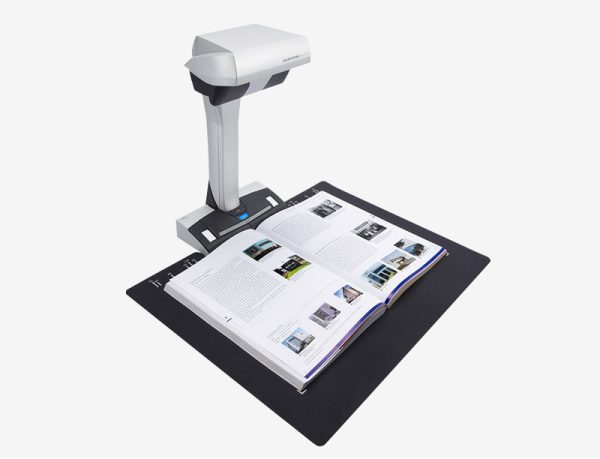
SV600 overhead contactless scanner.
This innovative overhead-style, contactless scanner brings a new perspective to document scanning. The overhead LED makes it easy to scan newspapers, magazines, books, and documents without cutting or damaging them.
View Document and Downloads
View Accessories & Consumables
Scanner Information
SV600 overhead contactless scanner.
The ScanSnap SV600 is an overhead style contactless scanner that provides a new perspective on document scanning. Unlike the typical scanner, you can easily scan newspapers, magazines, books or documents of up to 30mm thick directly with the overhead LED, without cutting or damaging them.
Easy, One-Button Scanning
Scans with just the push of a button, using intelligent image processing to deliver great results.
Page-Turning Detection
Detects when a page is turned and automatically begins scanning, so you don't have to push the scan button each time.
Multi-Document Detection
Scans multiple business cards, photos, and newspaper clippings in one batch, automatically cropping and rotating the scanned images.
Advanced Image Correction
Flattens curve distortions in scanned books and other bound documents, crops, and de-skews scanned images.

| Product Name | Specification | Description |
|---|---|---|
| Scanner Type | Overhead, Simplex | |
| Scanning Speed*1 (A3 Landscape) | ||
| Auto mode*2 | 3 seconds / page | |
| Normal mode | 3 seconds / page*3 (Color / Grayscale: 150 dpi, Monochrome: 300 dpi) | |
| Better mode | 3 seconds / page*3 (Color / Grayscale: 200 dpi, Monochrome: 400 dpi) | |
| Best mode | 3 seconds / page*3 (Color / Grayscale: 300 dpi, Monochrome: 600 dpi) | |
| Excellent mode | 3 seconds / page*3 (Color / Grayscale: 600 dpi, Monochrome: 1,200 dpi) | |
| Scanning Color Mode | Color, Grayscale, Monochrome, Automatic (Color / Grayscale / Monochrome detection) | |
| Image Sensor Type | Lens reduction optics / Color CCD x 1 | |
| Light Source | (White LED + Lens illumination) x 2 | |
| Optical Resolution | 285 to 218 dpi (Horizontal scanning), 283 to 152 dpi (Vertical scanning)*4 | |
| Document Size | ||
| Maximum | 432 x 300 mm (17.0 x 11.8 in.) | |
| Minimum | 25.4 x 25.4 mm (1 x 1 in.)*5 | |
| Paper Weight (Thickness) | 30 mm (1.18 in.) or less | |
| Interface*6 | USB2.0 / USB1.1 (Connector Type: Type-B) | |
| Power Requirements | AC 100 to 240 V, 50/60 Hz | |
| Power Consumption | ||
| Operating Mode | 20 W or less | |
| Sleep Mode | 2.6 W or less | |
| Standby Mode | 0.4 W or less | |
| Operating Environment | ||
| Temperature | 5 to 35 °C (41 to 95 °F) | |
| Relative Humidity | 20 to 80% (Non-condensing) | |
| Environmental Compliance | ENERGY STAR, RoHS | |
| Dimensions (W x D x H) | 210 x 156 x 383 mm (8.27 × 6.14 × 15.08 in.) | |
| Weight | 3 kg (6.62 lb) | |
| Driver | ScanSnap specific driver Windows: Does not support TWAIN / ISIS™ macOS: Does not support TWAIN |
|
| Software*7 | ScanSnap Home (for PC) (All-in-one document management software/driver) Kofax Power PDF Standard (Windows) Kofax Power PDF Standard for Mac (Mac) ABBYY FineReader for ScanSnap™ |
|
| Image Processing Functions | Deskew by text on document, Automatic size detection, Automatic rotation, Automatic color detection, Book image correction*8, Multiple document detection*9 | |
| Included Items | AC cable, AC adapter, USB cable, Safety Precautions, Background Pad, Extenders (x2) |
| No | Description |
|---|---|
| 1 | Scanning speeds may vary due to the system environment. The values shown are the results of the evaluation under the following environment • Windows 10 / CPU: Intel Core™ i3-10105 3.7GHz / Memory: 8GB / Storage: SSD • macOS Monterey 12 / CPU: 3.0GHz 6 core Intel Core™ i5 (8th Generation) / Memory: 8GB / Storage: SSD / used Mac Mini (2018) |
| 2 | "Better mode" or "Best mode". Switch between "Better mode" and "Best mode" depends on the length of the document, A4 (portrait, 200 dpi), A6 size or below (300 dpi). |
| 3 | Time between actual start of scanning (scanning pad) and finish scanning. |
| 4 | Optical resolution differs due to different scanning angle on the same document. |
| 5 | For documents of thickness over 5 mm, the maximum document size is 400 x 300 mm. |
| 6 | Compatible with USB 3.0 port but connection will run as USB 2.0 speed. |
| 7 | Installation and updates require Internet availability. Software/driver updates to the latest versions are recommended. |
| 8 | Automatically correct distortion caused by the curve of an opened book or magazine. |
| 9 | Automatically crop several documents in one scan. |
System Requirements for PC
| Compatible Operating Systems*1 | Windows 11 / 10 (32-bit / 64-bit) | |
|---|---|---|
| Driver / Applications*2 | ||
| ScanSnap Home*4 | Supported | |
| Kofax Power PDF Standard*5 | Supported | |
| ABBYY FineReader for ScanSnap™ | Supported | |
| Hardware Requirements*3 | ||
| CPU*6 | Intel or Intel-compatible processors | |
| Display Resolution | 1,024 × 768 pixels or more | |
| Disk Capacity*7 | 3.8 GB or more of free disk space |
| No | Description |
|---|---|
| 1 | Operate Windows in desktop mode. ScanSnap scanners do not run with Windows 11 and 10 ARM-based PCs such as Surface Pro X (Microsoft). |
| 2 | Operating systems listed in this table are the only ones supported. |
| 3 | The ScanSnap device may not work if the connected computer does not meet these requirements. |
| 4 | Installation requires a computer and Internet. |
| 5 | Please refer to the included license certificate to download the software. |
| 6 | Scanning speeds may vary due to the system environment. |
| 7 | .NET Framework 4.8 or later must be installed. If it is not installed, it is installed with ScanSnap Home. Up to 4.5 GB of disk space is required for the installation. |
*The system requirements may change depending on the support policies of the above system and third-party software.
System Requirements for Mac
| Compatible Operating Systems | macOS Catalina 10.15 or later | |
|---|---|---|
| Driver / Applications*1 | ||
| ScanSnap Home*3 | Supported | |
| Kofax Power PDF Standard*4 | Supported | |
| ABBYY FineReader for ScanSnap™ | Supported | |
| Hardware Requirements*2 | ||
| CPU*5 | Intel processor or Apple silicon | |
| Display Resolution | 1,024 × 768 pixels or more | |
| Disk Capacity | 2.5 GB or more of free disk space |
| No | Description |
|---|---|
| 1 | Operating systems listed in this table are the only ones supported. |
| 2 | The ScanSnap device may not work if the connected computer does not meet these requirements. |
| 3 | Installation requires a computer and Internet. |
| 4 | Please refer to the included license certificate to download the software. |
| 5 | Scanning speeds may vary due to the system environment. |
*The system requirements may change depending on the support policies of the above system and third-party software.
| Part | Part Number | Description |
|---|---|---|
| Cleaner F1 | PA03950-0352 | 100 ml bottle For use on the Pad unit and Pick roller |
| Cleaning Wipes | PA03950-0419 | 24 packets For use on the Pad unit and Pick roller |
| Options | ||
| Background Pad | PA03641-0052 | Set in front of the scanner when scanning. *One pad is bundled with the scanner. |
*It is recommended to use original or approved accessories for consumables, options and cleaning kits, specially designed for your device. Device failures, troubles and damages arising from use of OEM or 3rd Party accessories may render your warranty invalid and incur charges for repair even during the warranty period.